
MyQuest for Patients
Quest Diagnostics IncorporatedMedical
4.618.91K Reviews
- Version
- 6.0
- Installs
- 1.00M
- Age Rating
- Everyone
Screenshots
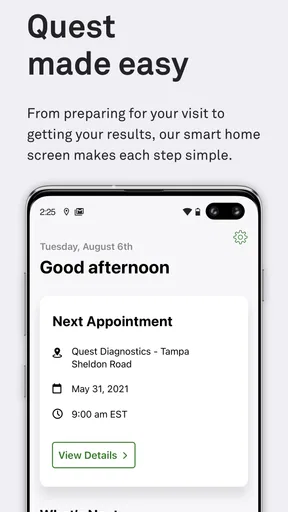
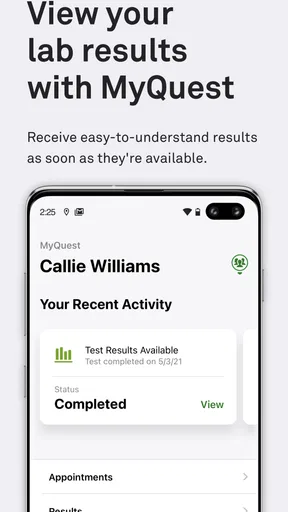
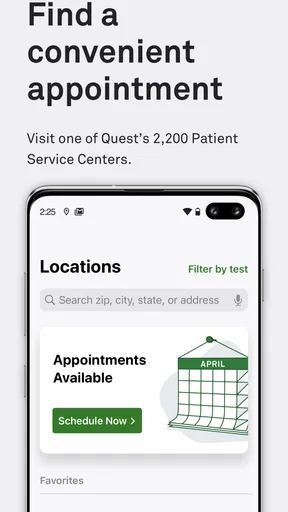
Our Review of MyQuest for Patients
 Analysis by Appyee
For me, the most useful way to think about MyQuest for Patients is as a place to check Quest Diagnostics lab results without waiting for a paper copy or trying to remember where an old message went. That sounds like a small convenience, but it changes the rhythm of a test: I can look when the result is available, then decide what I need to do next instead of repeatedly wondering whether anything has come through.
What it changes about checking lab results
A lab result is only one part of a healthcare visit, and seeing it on a phone does not explain what it means or replace a clinician’s advice. The practical value is easier access to the result itself. I find that most helpful when I want to revisit information after an appointment, compare it with what I remember being told, or have the details at hand when I speak with a healthcare professional.
That distinction matters. A result appearing in an app is not the same as receiving a diagnosis, and a notification is not a signal to change medication or treatment. I would use the app to find and review the information, then direct questions about its meaning to the clinician responsible for my care. Keeping those roles separate makes the convenience genuinely useful rather than misleading.
A practical routine for using results well
When I know I have a test coming up, I treat the app as one step in a simple routine: keep track of the appointment, check back for the result, and make a note of anything I want to ask at follow-up. If a result is available before I have a conversation with my clinician, writing down questions helps me avoid reacting to a number in isolation or forgetting what I wanted clarified.
It is also worth checking that I am looking at the right record, especially if I manage health information for more than one person or have had tests at different times. A quick pause to confirm whose result and which visit I am viewing can prevent confusion when discussing details later. That is a modest habit, but it is more dependable than relying on memory alone.
The app makes the most sense when Quest Diagnostics is part of the care process. If a test was handled elsewhere, I would not assume its result will appear here; I would use the route provided by that laboratory or clinic instead. In that way, MyQuest is a focused companion to one provider’s lab services, not a universal file for every medical record I have.
Where it fits in a busy day
Picture a familiar situation: I have a test connected to a routine appointment, then get pulled into work and family errands. Rather than call around or keep checking email, I can return to the app when I have a quiet moment and see whether the information is ready. If it is, I can read it at a pace that suits me and prepare a question for my next conversation with my clinician.
That convenience is particularly useful for people who prefer to handle small administrative tasks on a phone. It can also help someone who has several appointments to keep straight, since the app brings lab-related activity and appointment information into one place. I would still keep any appointment instructions from the clinic and use the clinic’s preferred contact method for urgent changes; an app is helpful, but it is not a substitute for direct communication when timing matters.
Compared with the usual alternatives, the main difference is that this is a dedicated Quest Diagnostics app rather than a general health notebook or a broader patient portal from a particular medical practice. A notebook can hold personal notes, but it will not provide the same direct route to Quest-related lab information. A clinic portal may be better for messages and care plans from that clinic, while MyQuest is the more natural place to check the Quest side of the process. I would not expect one tool to replace the others.
Who is likely to get the most from it
I would recommend it most to people who use Quest Diagnostics and want an easy phone-based way to revisit lab results and keep appointment details close. It may also suit someone who helps a family member stay organized, provided they take care to check which person’s information is open before acting on it. The benefit is less about doing something complicated and more about lowering the effort involved in finding the relevant details.
On the other hand, if I rarely use Quest Diagnostics, already rely on a clinic portal that covers everything I need, or mainly want a place to message my doctor, this would not be my first choice. Its value depends on the role Quest plays in my care. People who need help interpreting a result should contact a qualified healthcare professional rather than treating an app screen as the final word.
MyQuest is a free medical app from Quest Diagnostics Incorporated. It has a 4.4 average from around 44,000 ratings, and more than a million installs, which suggests that many people have found a reason to keep it in their routine. It is rated for everyone, though the medical information it displays can be personal, so I would use a device lock and be mindful when viewing it around other people.
Getting Started with MyQuest for Patients
First off, setting up MyQuest for Patients was a breeze. You sign up with your email, create a password, and you’re pretty much good to go. The interface is clean and user-friendly, which is always a win in my book. I hate when apps have a million buttons and options that make you feel like you’re piloting a spaceship. Here, everything is straightforward and easy to navigate.
Once you’re in, you’re greeted with a dashboard that lets you access your lab results, appointments, and even pay your bills. It’s like having a mini-clinic in your pocket. The app supports both Android and iOS, so whether you’re team iPhone or Android, you’re covered.
Features That Stand Out
One feature I absolutely love is the real-time updates on lab results. You get notified instantly when your results are ready. No more waiting for your doctor to call or wondering when you’ll get that email. It’s all right there, just a tap away.
Another nifty tool is the appointment scheduling. I know, I know, many apps have this, but what makes it cool here is the reminder system. I’m someone who can forget an appointment two minutes after I make it, so having reminders pop up is a lifesaver.
The app also integrates with your phone’s calendar, which is super handy. You can sync all your appointments and even set custom alerts, which means you’ll never miss another check-up ever again. Trust me, it’s a game-changer.
User Experience and Design
Let’s talk about design. The color scheme is easy on the eyes, which is essential for something you’ll be using regularly. There’s nothing too flashy, just a simple, elegant design that gets the job done without distracting you.
Performance-wise, I didn’t experience any lags or crashes, which is always a concern with apps that store sensitive data. The developers did a solid job on this front. Everything runs smoothly, and the touch response is spot on.
The app also has a secure login process, which made me feel confident about the privacy of my medical information. In today’s world, where data breaches are a real issue, having that extra layer of security is a relief.
What Could Be Improved?
While MyQuest for Patients hits a lot of high notes, there are a couple of areas where it could improve. For starters, the bill payment feature could use a bit more flexibility. Currently, it’s a bit basic, and adding more payment options would be a welcome upgrade.
Additionally, the app could benefit from a feature that allows users to communicate directly with their healthcare providers. A messaging system would be a fantastic addition, making it easier to ask quick questions or clarify appointment details.
Final Thoughts
All in all, MyQuest for Patients is a solid app for anyone needing to keep track of their medical appointments and test results. It’s user-friendly, efficient, and designed with the patient in mind. While there are a few areas for improvement, it’s a reliable choice for managing your health on the go.
If you’re tired of juggling multiple apps or stressing about missing an appointment, give this app a try. It could be just what you need to simplify your healthcare experience. So, go ahead, download it, and see how it fits into your health management routine. Who knows, it might even make doctor visits a little less daunting!
A few sensible habits make it more useful
Because the app brings results and appointment details together, I would use it as a reference point rather than my only record. For an upcoming visit, I might check the relevant result beforehand and jot down a short list of questions elsewhere, so I can focus on the conversation instead of trying to remember every detail on the spot. That is especially helpful when a result raises a question but does not, by itself, explain what action is appropriate.
Notifications are convenient, but I would not build an urgent-care plan around them. If I am waiting on information that affects an immediate decision, I would contact the clinic or the professional who ordered the test and ask what to do. A phone notification can make routine follow-up easier; it cannot ensure that a clinician has reviewed the result or answer a time-sensitive medical concern.
For someone who is new to digital health tools, one useful first step is simply to open the app before a test-related appointment and get comfortable finding the relevant sections. That avoids learning the layout while distracted or in a hurry. If access does not work as expected, I would check that I am using the account associated with the Quest service and seek help through the appropriate support channel rather than creating duplicate records or guessing at information.
Choosing it alongside other health tools
There is a trade-off between a focused app and an all-in-one health organizer. A broad organizer may be more convenient for collecting records from several clinics, but it can require manual entry or depend on connections that vary by provider. MyQuest is more directly useful for the Quest portion of care, where I want to check its lab-related information without maintaining a separate note for every detail. I would pair it with a clinic’s portal when that portal is where care plans, clinician messages, or other records live.
That division also answers a common practical question: should this replace a doctor’s portal? I would say no, not if the portal is where I arrange care or communicate with the medical team. I see MyQuest as complementary. It can make the lab-results part more accessible, while the clinic remains the better place for questions that need a response from the people providing care.
Another reasonable question is whether the app is worthwhile if I only have an occasional test. It can still be handy if I prefer checking on my phone and want appointment information close by, but someone with very infrequent Quest visits may not need another app in their routine. In that case, the deciding factor is convenience: if looking up results digitally saves effort, it earns its place; if a clinic already gives me a simpler route, I can stick with that.
Setting expectations before relying on it
The app’s version 5.6 supports devices running Android 6.0 or later. I would check compatibility before planning to use it on an older phone, since an unsupported device can turn a simple task into unnecessary frustration. Its free price makes trying it straightforward, but I would still consider whether I am comfortable opening health information on my personal device and keep access protected in the usual way.
My overall view is that this is most valuable when I treat it as a convenient window into Quest-related lab activity, not as a complete healthcare system. It can reduce the small hassles of finding results and staying organized, while the clinician remains essential for context, interpretation, and decisions. If that is the part of healthcare I want to make easier, I can see a clear reason to use it; if I need broader communication and records from multiple providers, I would choose a broader portal or use both tools side by side.
Privacy and Permissions
See what permissions an app requests and how it handles your data.
- Location
- approximate location (network-based), precise location (GPS and network-based)
- Phone
- directly call phone numbers
- Photos/Media/Files
- read the contents of your USB storage, modify or delete the contents of your USB storage
- Storage
- read the contents of your USB storage, modify or delete the contents of your USB storage
- Camera
- take pictures and videos
- Microphone
- record audio
- Wi-Fi connection information
- view Wi-Fi connections
- Other
- view network connections, full network access, run at startup, control vibration, prevent device from sleeping
Verdict
Strengths of MyQuest for Patients
- User-friendly interface for easy navigation.
- Comprehensive tracking of health progress.
- Secure messaging with healthcare providers.
- Customizable reminders for medications.
- Access to educational health resources.
Limitations of MyQuest for Patients
- Limited offline functionality.
- Requires account setup for full access.
- Some features need premium subscription.
- Occasional sync issues with devices.
- Not all providers are integrated yet.
Similar Picks in This Category
View All
WebMD: Symptom Checker
WebMD, LLC4.1

Microphone Amplifier
DOSA Apps4.2

Anatomy Learning - 3D Anatomy
3D Medical OU4.5

Period Tracker and Calendar
SimpleInnovation4.9

GoodRx: Prescription Coupons
GoodRx4.8

CVS Health
CVS Pharmacy4.5
Frequently Asked Questions
What is MyQuest for Patients, and how does it work?
MyQuest for Patients is a mobile app designed to help users manage their lab test results and appointments conveniently. It provides access to lab results, allows users to schedule appointments, and offers health insights. The app is user-friendly and integrates with your healthcare provider to streamline your health management process.
Is MyQuest for Patients available on both Android and iOS?
Yes, MyQuest for Patients is available for download on both Android and iOS platforms. Users can find the app on the Google Play Store for Android devices and the Apple App Store for iOS devices. The app is designed to work seamlessly across different devices, ensuring you have access to your health information anytime, anywhere.
How secure is my personal health information on MyQuest for Patients?
MyQuest for Patients prioritizes the security of your personal health information. The app uses advanced encryption protocols to protect your data. Moreover, it complies with healthcare regulations such as HIPAA, ensuring that your information is handled with the highest standards of privacy and security.
Can I share my lab results with my healthcare provider through MyQuest for Patients?
Yes, MyQuest for Patients allows you to easily share your lab results with your healthcare provider. The app facilitates direct communication between you and your health professionals, ensuring that your care team has timely access to essential information for making informed healthcare decisions.
Are there any costs associated with using MyQuest for Patients?
MyQuest for Patients is free to download and use. However, standard data charges from your mobile service provider may apply. The app itself does not have hidden fees, and its core functionalities, such as accessing lab results and scheduling appointments, are available at no cost to the user.
